More than 10 capture modes
Capture the full screen, active windows, selected regions, scrolling pages, DirectX content, screen video, and sound.
 Free Screen Capture
Super Screen Capture is an all-in-one screen capture utility for Windows. Capture anything you can see on your screen, edit it, and send the result wherever you need it.

 Save as BMP, JPG, PNG, or GIF
 Open in an image editor
 Send captures to a printer
 Send captures
 Copy to the clipboard
 Send captures to Word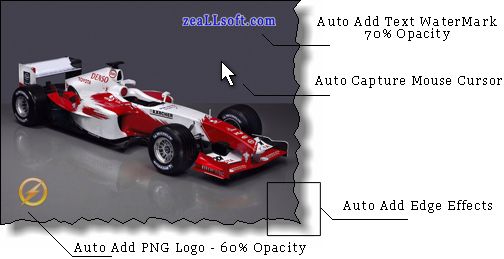
Capture game screens, DirectX content, Flash animations, and video playback when ordinary screenshot tools miss the image you need.
Capture the full screen, active windows, selected regions, scrolling pages, DirectX content, screen video, and sound.
Common capture actions are easy to find, so you can take a screenshot quickly without digging through menus.
Annotate captures, add edge effects, adjust images, and prepare screenshots before saving or sharing them.
Save to a file, copy to the clipboard, print, email, open in an editor, or send captures to office tools.
Assign hotkeys to capture modes and repeat frequent actions faster.
Work with common image formats including BMP, JPG, PNG, and GIF for easy sharing and documentation.
"Very easy and powerful screen capture software. The auto-scrolling window capture feature rocks."
"Whatever you can see on your screen, it captures it for immediate use. A great buy."